
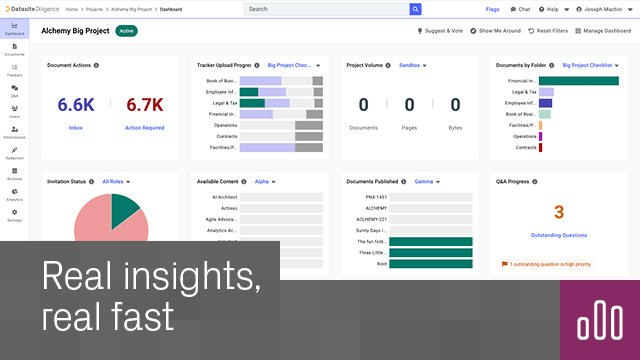
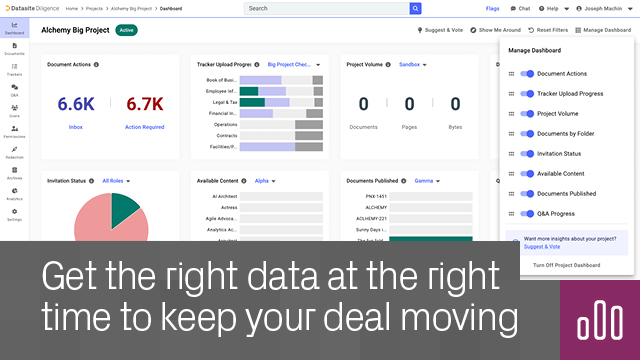
What is Project Dashboard? Project Dashboard is your real-time summary of your Datasite Diligence or Datasite Prepare project, focusing on the key indicators that matter most to you.
How do I turn on Project Dashboard? Open any Diligence or Prepare project, go to the top-left navigation panel and click Let’s Go. You can also turn on Project Dashboard from the apps page. Once on, your Project Dashboard will stay in the top left nav panel as part of your home screen for all your Diligence and Prepare projects.
To turn Project Dashboard off:
Who can access it? All project admins of a Diligence or Prepare project can access the Project Dashboard.
If I enable the dashboard on one project, is it enabled for all? Yes. Your Project Dashboard setting applies across all projects where you have Project Admin permissions.
Does it work for existing projects? Yes, the dashboard works across all new and existing Diligence and Prepare projects.
Where does the dashboard get its data? Information is pulled directly from your Diligence or Prepare project via API in real time. Any change made in the project is reflected instantly.
Can I interact with the visualizations? Absolutely. Each chart and widget is interactive, enabling you to drill into the detail, and also navigate straight to the relevant areas of your project.
Security
Nenhuma avaliação ainda
Este aplicativo ainda não foi avaliado.
